Most local business websites have one page trying to sell everything. A service page fixes that: one page, one service, written for the person searching for exactly that thing. This post is the full anatomy of one, in the order I build it, using the nine live service pages on this site as the worked example.
There is a harder question underneath it, and almost nobody asks it first. Before you write a service page, you have to check whether the search you are chasing wants a service page at all.
Key Takeaways
- Most pages never build a real outline: an
<h1>is present on 71% of desktop pages and 70% of mobile, but only 66% carry one with any text in it, and heading use falls away to 37% by<h4>(HTTP Archive Web Almanac, 2025)- The length bar is lower than owners assume: the median inner page in that crawl carried 339 words on desktop and 323 on mobile, so a page that answers the question properly clears the middle of the pack without padding (HTTP Archive Web Almanac, 2025)
- Check the search results before you write anything: twice in one research round, the live results told me to build a different page than the one I had planned, and both are better for it.
A note on the numbers below. The Web Almanac figures come from a crawl of the web at large, not from a sample of Ontario local businesses, and several of them are reported separately for home pages and inner pages. A service page is an inner page, so that is the figure quoted wherever the split exists.
What Is a Service Page, and Why Does Each Service Need Its Own?
A service page is a single page about a single service, built to match a single search. It exists because somebody searching for gutter cleaning wants a page about gutter cleaning, not a homepage with a list of eight things you do. One service per page also gives each job its own place for proof, pricing and a call to action.
The reasons to split them are practical rather than theoretical:
- One page, one search: a page that covers roofing, siding and eavestroughs has no clear subject, so it matches all three searches weakly instead of one strongly.
- Somewhere to put the proof: the roofing job photos belong on the roofing page, where the roofing customer is standing.
- Somewhere to put the price: services rarely cost the same, and a single page cannot name a starting figure for all of them.
- A route in from search: somebody can land on a service page without ever passing your homepage, so each one needs its own phone number, form link and next step.
- Something to link from: your city pages, your blog posts and your Google Business Profile all need a specific page to point at.
This site runs nine service pages, built in one pass on August 13, 2026, from local SEO services through to website maintenance, all listed on the services page. Eight of them are one page for one service. The ninth is an umbrella hub that describes the whole range and links down to the rest, which is a different job from trying to rank two services on one page.
Should You Even Build a Service Page for That Keyword?
Search the keyword yourself before you write a word. Google has already decided what kind of page belongs at the top of that query, and if the answer is not a sales page, yours will not get there no matter how well it is written. This check takes ten minutes in a private browser window and it has changed what I built more than once.
Here is what the check actually returned on four keywords during one research round in August 2026, and what I did about each:
| Keyword | Volume/mo | What the check turned up | The call |
|---|---|---|---|
| local seo services | 880 | Canadian providers ranking through the page, plus a local pack | Commercial. Build the service page |
| google business profile optimization | 260 | Support articles, forum threads and how-to guides | Informational. Teach first, sell second |
| google ads management | 210 | Google’s own login, support and ad manager pages, plus Reddit | Navigational. Retarget the page |
| facebook ads management | 9,900 | Every long-tail phrase beneath it sitting near 10/mo | False friend. They want Meta’s tool |
Two of those four verdicts changed a page I had already planned, and a third stopped one being planned at all. What each check bought:
- Google ads management is people logging in: the top of that result page is Google’s own properties, because searchers want their own ad account, not an agency. That page now targets google ads agency instead, and the Google Ads management page says so in its own source comments.
- Google business profile optimization is people looking for instructions: a pure sales page cannot rank against a page of instructions. So the Google Business Profile management page gives away the full eight step optimization checklist, free and in full, before it explains what the flat fee buys. Its own copy says none of it is secret and all of it is free to do yourself.
- The 9,900 a month keyword was the trap: the volume looked like the biggest opportunity on the list until the long-tail phrases underneath it all came back near 10 a month. That distribution means people searching for Meta’s own Ads Manager tool, not for someone to run their ads.
- The cheap version of this check is free: search the term in a private window, ignore the ads, and read the titles of the first ten results. If they are forum threads and support articles, write the guide instead of the sales page.
What Has to Be Visible Before Anyone Scrolls?
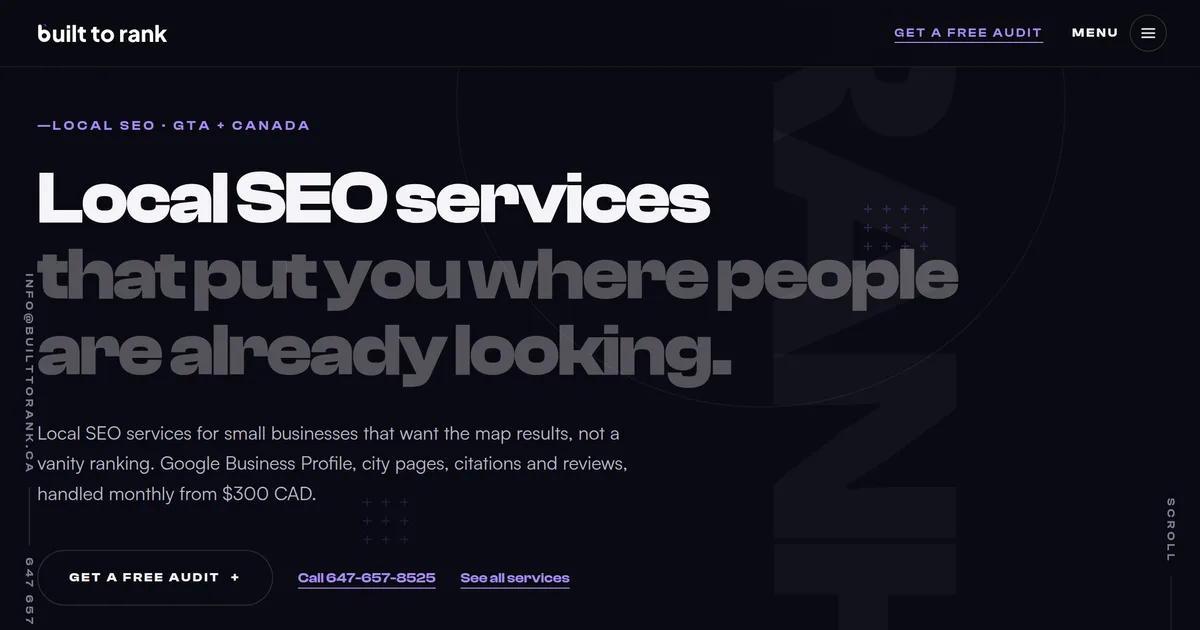
Someone arriving from a search gives the page a few seconds to prove it is about their problem. Everything that earns those seconds has to sit above the fold on a phone: what the service is, where you do it, roughly what it costs and how to reach you. The screenshot above is the real top of the local SEO services page on this site, and every element in it is doing one of those jobs.
| Element | What it says | Why it is there |
|---|---|---|
| Eyebrow line | Local SEO · GTA + Canada | Names the service and the service area above the headline |
| Headline, first line | Local SEO services | The exact phrase the visitor searched, in the page heading |
| Headline, second line | that put you where people are already looking | The outcome, so the heading is not only a keyword |
| Opening paragraph | What is included, and from $300 CAD | The scope and the starting price, before any scrolling |
| Primary action | Get a free audit | One obvious next step, repeated later on the page |
| Secondary action | Call 647-657-8525 | A tap to call link, because a phone is what the visitor is holding |
| Tertiary link | See all services | A route onward for the visitor who is not ready to act yet |
Government service teams arrive at almost the same checklist from a completely different direction. The UK Government Design System tells teams a start page should “give the user just enough information to help them understand what the service does and whether it will meet their need” (GOV.UK Design System). The same guidance asks them to cover “how much it costs to use the service and roughly how long it will take”, and to “include details of other ways to access the service”, naming the phone as its example (GOV.UK Design System).
A few rules I hold to on that block:
- Put the keyword in the heading, not near it: the page heading leads with the phrase people actually type, then turns into a benefit on the second line.
- Name the geography early: a local business page that never says where it works is asking the visitor to guess.
- Give one primary action, not four equal ones: there are three links in that hero, and only the audit pill is styled as a button, because a row of equally weighted buttons is a row of decisions.
- Do not label the button Learn more: Google’s own Lighthouse audit ships a hard-coded list of link text it treats as non-descriptive, and learn more, read more, click here and more info are all on it (Lighthouse source).
- Make the phone number a tap to call link: MDN is blunt about what a
tel:link does on a phone, “Cellular devices autodial the number” (MDN). - Size that button for a thumb: WCAG 2.2 sets the floor at 24 by 24 CSS pixels, and the reason given is accidental activation of whatever sits next to it (W3C, WCAG 2.2).
- Say the price or say the range: the visitor is going to ask within two minutes anyway.
What Goes in the Middle of a Service Page?
The middle of the page answers the questions the visitor would ask on a phone call, in roughly the order they would ask them. Scope first, then process, then proof, then price, then objections. On the service pages here, the sections a buyer actually searches for are question headings with the answer in the sentence underneath, and the rest are plain labels.
Question headings are my own choice. The heading structure underneath them is not: MDN records that “A common navigation technique for users of screen reading software is to quickly jump from heading to heading”, which is why the same page says “Do not skip heading levels: always start from <h1>, followed by <h2> and so on” (MDN). W3C makes the wider point in its guidance on section headings: headings give readers mental handles that aid comprehension of the content (W3C, WCAG 2.2).
Most pages give them very little to work with. An <h1> appears on 71% of desktop pages and 70% of mobile, falling to 66% once the empty ones are excluded, and <h4> is down at 37% (HTTP Archive Web Almanac, 2025). Automated accessibility testing checks for this directly, with a rule whose entire job is to confirm a page contains a level-one heading (axe-core).
Length is the wrong thing to worry about. In the same crawl, the median inner page carried 339 words on desktop and 323 on mobile, so a page that genuinely covers scope, process, proof and price is past the median before you have padded a single paragraph (HTTP Archive Web Almanac, 2025).
The sections that earn their place:
- What is actually included: a specific list, not adjectives. Categories, services, photos, posts and review responses beats “comprehensive management”.
- How the work runs: what happens in week one, what happens monthly, who does it. This is the section that separates an operator from a reseller.
- What it costs: a starting figure and what moves it.
- Who it is for, and who it is not: turning away the wrong customer on the page saves both of you a call.
- Questions people actually ask: pulled from real calls and real emails, not invented to fill a heading.
- The next step, again: the visitor who reads the whole page should not have to scroll back to the top to act.
Does a Service Page Need to Show Pricing?
Publishing a starting price costs you some enquiries and improves every one that survives. Every service page on this site that has a fixed price names it, including: websites with local SEO built in from $999 CAD, an SEO retainer from $300 a month, SEO with ads management from $600, Google Business Profile management at a flat $250.
The two where the work genuinely varies, AI automation and custom apps, say quoted per project in those words rather than hiding behind contact us. Most competitors in this market publish neither kind of answer.
What naming the number actually does:
- It filters before the phone rings: the person whose budget is $200 leaves the page instead of taking a call, and neither of you loses an afternoon.
- It answers the question the page is really being asked: price is the first thing most visitors want and the last thing most agencies put in writing.
- It gives you something no competitor page has: on a result page where every listing says “contact us for a quote”, a real figure is the only new information available.
- It sets the frame for the quote: a visitor who arrives already knowing the floor is negotiating from your number rather than from nothing.
- It has to be honest about what moves it: a starting price with no explanation of what pushes it up reads as a bait number, which is why what a website actually costs in Ontario spends most of its length on the things that move the figure.
What Kind of Proof Belongs on a Service Page?
Proof on a service page means work you actually did, named, linkable and checkable. This is also the section where most small business sites quietly start lying, because real proof is slow to accumulate and stock testimonials take five minutes to write. The constraint is the point: if a reader can verify one thing on your page, they will extend that trust to the rest of it.
What I can put on a service page here, and what I cannot:
- Two real client builds: World Food Equipment and Dev Vashi, each with its own case study page describing what was actually built.
- No testimonials I can’t back up: there are no client quotes on this site right now, and none will go up until a client writes one.
- The thing that was genuinely built: a Three.js walk-in cooler configurator, an interactive ward map, a live lead-reply agent. Describing the work is proof that survives checking.
- No invented numbers: no percentage lifts, no traffic claims, no “our clients see”. There is not one ranking or traffic figure anywhere on this site, because there is not one that would survive being checked.
- A link to the real thing: a case study a visitor can open beats a logo strip they cannot.
If you have one good job and one real review, put those on the page and nothing else. A page with one verifiable proof point outperforms a page with six invented ones the moment a single visitor checks.
What Schema Markup Should a Service Page Use?
A service page carries three blocks worth adding: Service for the thing you sell, FAQPage for the questions in the visible text, and BreadcrumbList for where the page sits. The business itself is described once, sitewide, and each service page points back at it rather than repeating it. Here is the actual Service block from the local SEO page on this site:
{
  "@context": "https://schema.org",
  "@type": "Service",
  "name": "Local SEO Services",
  "serviceType": "Local Search Engine Optimization",
  "url": "https://builttorank.ca/local-seo-services",
  "provider": { "@id": "https://builttorank.ca/#business" },
  "areaServed": [
    { "@type": "AdministrativeArea", "name": "Greater Toronto Area" },
    { "@type": "Country", "name": "Canada" }
  ],
  "offers": {
    "@type": "Offer",
    "price": "300",
    "priceCurrency": "CAD",
    "description": "Monthly local SEO retainer from $300 CAD. Google Business Profile, city and service pages, citations, reviews and reporting."
  }
}
The parts that matter:
provideris a reference, not a copy: the@idpoints at the business described once in the site layout, so nine service pages do not publish nine slightly different versions of the same business.areaServedis where you work, not where you sit: it carries the Greater Toronto Area and Canada here, because the service area is genuinely both.offerscarries the same number the page shows: markup that disagrees with the visible page is worse than no markup.FAQPageonly describes questions a reader can see: if the answer is not in the body text, it does not belong in the markup.- None of this is a ranking trick: it describes the page to machines. It does not make a weak page rank, and anybody selling it as a shortcut is selling you a shortcut that does not exist.
Structured data itself is common; these particular types are not. Half of all home pages carried structured data of some kind in 2025, on both desktop and mobile, and on inner pages JSON-LD specifically appeared on 39% of desktop and 37% of mobile crawls (HTTP Archive Web Almanac, 2025). In the 2024 chapter, the ranked list of the 15 most common schema types on inner pages did not include LocalBusiness, Service or FAQPage (HTTP Archive Web Almanac, 2024).
The definitions are worth reading once, because they describe a local service page almost exactly. schema.org defines Service as “A service provided by an organization, e.g. delivery service, print services, etc.” and areaServed as “The geographic area where a service or offered item is provided”. What you do, and where you do it.
How Do You Stop Your Service Pages From Competing With Each Other?
Write down which page owns which search, once, and never let a second page target it. This sounds bureaucratic until you have nine service pages, nine city pages across five cities and a dozen blog posts, at which point it is the only thing stopping you from writing the same page twice under two names. The rule here is one keyword, one page, recorded in a single file.
How the boundaries are drawn on this site:
- Hubs never carry a city name: web design services owns the plain head term and is not allowed a city in its title, heading or URL.
- City pages own the geography: SEO in Mississauga and SEO in Brampton own their city searches, and the hub links down to them instead of competing.
- Blog posts never take a money page’s keyword: this post targets a question, and links down to the pages that own the commercial terms.
- One owner per phrase, written down: when a new page wants a keyword that already has an owner, the new page loses and gets a different angle.
- Link with words that describe the target: in the 2025 crawl, inner pages passed the descriptive-link-text audit on 92.42% of desktop pages against 84.64% for home pages, so vague link text is more of a home page habit than a deep page one (HTTP Archive Web Almanac, 2025).
- Count your links, then discount the menu: at the median a desktop page carries 43 links to its own site and a mobile page 39, rising to 174 on desktop at the 90th percentile (HTTP Archive Web Almanac, 2025). The Almanac reads that high end as mega-menus and dense footers on larger sites rather than body copy, and it reports the figure across all crawled pages without splitting home from inner.
- Service area pages are a different job: if you work in several cities without an address in each, that is ranking in multiple cities, which is its own problem.
Frequently Asked Questions
How many service pages should a small business website have?
One for every service you genuinely want phone calls about, and no more. A page for a service you do not really want, or cannot describe in detail, is a page with nothing on it. This site runs nine, one per service, and each one exists because there is a real search behind it.
What is the difference between a service page and a location page?
A service page answers what you do. A location page answers where you do it. They are separate because they match separate searches, and mixing them creates two half pages that compete with each other instead of one strong page for each.
Should a service page show prices?
Publishing a starting price filters your enquiries before they reach the phone, which is worth more than the extra volume you get from hiding it. Every service page on this site that has a fixed price names it, and the two where the work genuinely varies say quoted per project instead. The people who leave were never going to buy, and the ones who stay already know the range.
Does a service page need FAQ schema?
It is worth adding if the questions are real ones customers ask and the answers appear in the visible page text. Do not write questions purely to fill a schema block, and never put an answer in the markup that a reader cannot find on the page.
How long should a service page be?
Long enough to answer the question completely and not a word longer. Word count is not a ranking setting. If your page covers what the job involves, what it costs, who did it before and what happens next, it is finished regardless of whether that took 700 words or 2,000.
Why is my service page not ranking even though it is well written?
The most common reason is that the search you are targeting does not want a service page at all. Search the term yourself and look at what Google is actually ranking. If the results are support articles, forum threads or login pages, no amount of polish on a sales page will get you into them.
Wrapping Up
A service page is not a brochure page with a keyword dropped into it. It is one page answering one search, with the scope, the price, the proof and the next step all visible without hunting.
The part most people skip is the cheapest and the most useful. Search your keyword before you write, read what Google is already ranking, and build the kind of page the result page is asking for.
If you want to know which of your pages are competing with each other and which searches you are missing entirely, get a free website audit and I will go through it with you.
Further reading: why nobody is filling out your contact form · why your website is not showing up on Google · whether a local business can show up in ChatGPT and AI search