If your website is not showing up on Google, the cause is almost always one of two things, and they need completely different fixes. Either Google does not have a copy of your site at all, or it has one and is ranking you below everybody else. Most owners assume the first and are actually dealing with the second.
This guide separates the two in a single search, then walks the checks in the order I run them on a free website audit.
Key Takeaways
- Run
site:yourdomain.cain Google first. Results mean you are indexed and the problem is ranking; no results mean Google has no copy of your site- A
noindexdirective, the tag that tells Google to stay out, is present on 3.5% of desktop sites and 2.4% of mobile sites (HTTP Archive Web Almanac, 2025)- Being indexed is a low bar. Only 66% of pages carry a non-empty H1 and 67.2% of mobile pages have a meta description, so the basics are still where most local sites lose (HTTP Archive Web Almanac, 2025)
Most web-wide figures in this post come from one source, the HTTP Archive Web Almanac, an annual crawl of millions of real websites that publishes its methodology. It samples the crawlable web, not Ontario local businesses specifically. Semantics are cited to MDN.
Is Your Website Not Showing Up on Google, or Just Not Ranking?
Those are two different problems, and one search separates them: search Google for site: followed by your domain, with no space between them. If Google lists your pages, your site is indexed and every “Google cannot find me” theory is off the table. If it returns nothing, Google genuinely has no copy of your site, and that is the smaller and faster problem of the two.
- The site: search: type
site:yourbusiness.cainto Google. The number of results it reports is roughly how many of your pages Google is holding. - URL Inspection in Search Console: paste any single page URL and Google tells you whether that exact page is indexed, when it last crawled it, and what blocked it if anything did.
- The Pages report: under Indexing, it splits every URL Google knows about into indexed and not indexed, with a reason attached to each exclusion.
- Check the right address:
www.and non-www., andhttpandhttps, are four different addresses to Google. Verify the one customers actually land on.
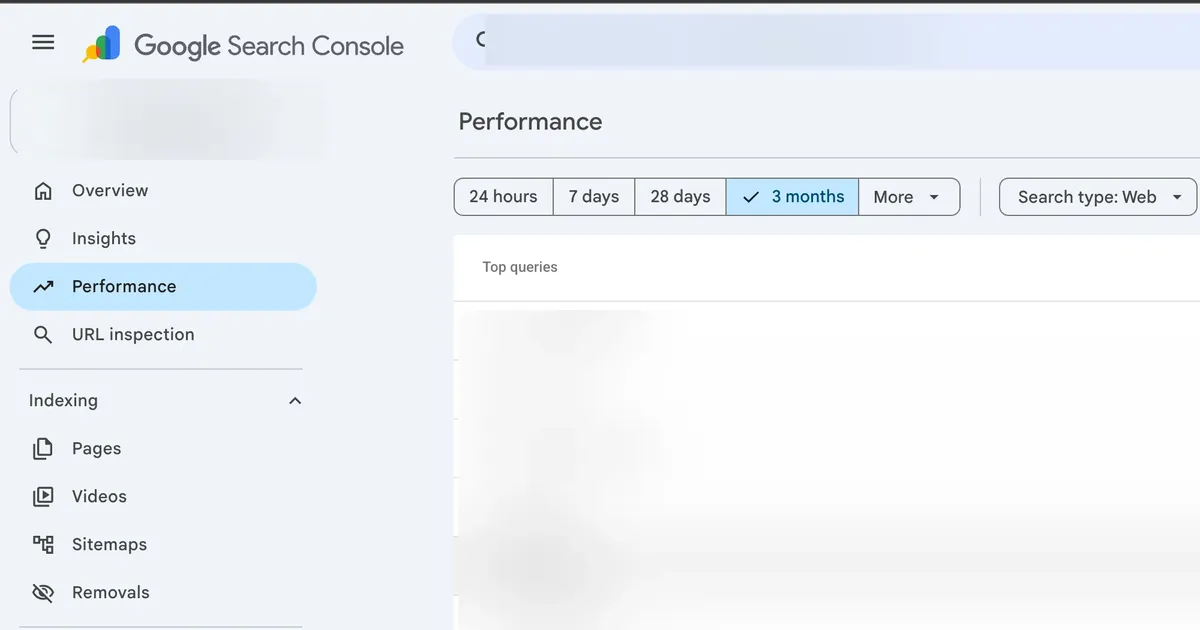
Free tools do this job better than any paid checker. Google Search Console is the only place that tells you what Google itself thinks of your site, and setting it up takes about ten minutes.
What Stops Google From Crawling or Indexing a Small Business Website?
A handful of technical blocks account for nearly every genuinely unindexed site, and most of them are leftovers from the build rather than anything you did. The single most common is a noindex tag that was added deliberately to keep an unfinished site out of search and never removed at launch.
- A leftover noindex tag: the
noindexdirective appears on 3.5% of desktop sites and 2.4% of mobile sites (HTTP Archive Web Almanac, 2025). Plenty of those are intentional, but a live business site should never be one of them. - An X-Robots-Tag header: the same instruction delivered in the server response instead of the page code, used on 0.6% of desktop and 0.7% of mobile sites (HTTP Archive Web Almanac, 2025). It is invisible in the page source, which makes it the nastiest version to find.
- A coming soon or maintenance plugin: these usually apply a noindex site-wide and stay switched on long after launch day.
- A broken robots.txt: 85% of robots.txt requests return a valid 200 response and 13% return a 404, with roughly 1.0% timing out and 0.5% returning a 403 (HTTP Archive Web Almanac, 2025). A missing file is harmless. A timing out or forbidden one is not.
- Content that only exists in JavaScript: if the words appear only after a script runs, indexing gets slower and less reliable than plain server-rendered HTML.
There is one distinction worth getting right, because it sends people chasing the wrong file: robots.txt controls crawling, not indexing. MDN describes it as specifying “whether or not crawlers are allowed access to an entire website, or to specified resources”, with indexing rules set separately through a robots meta tag or an X-Robots-Tag header (MDN Web Docs). Blocking a page in robots.txt can stop Google reading it while the URL still appears in results. The same file is now where you control AI crawlers such as GPTBot and ClaudeBot, which is covered separately in can a local business show up in ChatGPT and AI search.
Meta robots directives of some kind sit on 47.0% of desktop and 47.9% of mobile sites (HTTP Archive Web Almanac, 2025), so the tag itself is completely normal. What matters is which value yours is set to.
Does Google Know Where All Your Pages Are?
Google finds pages by following links and by reading an XML sitemap. A small business site with few inbound links and a thin internal linking structure gives it very little to follow, which is exactly when submitting a sitemap stops being optional.
- Submit an XML sitemap: most site platforms generate one automatically. Find it, then add it under Sitemaps in Search Console so Google has a full list rather than a trail of links.
- Link your own pages together: every service page should be reachable from the main navigation in one click, not stranded with no links pointing at it.
- Pick one address and redirect the rest: on this site,
wwwrequests are 301 redirected to the bare domain so there is only ever one version of any page. - Watch the trailing slash:
/servicesand/services/can be served as two separate pages. This site is built to serve clean URLs with no trailing slash and redirect the variant, so Google never has to guess.
Canonical tags are the polite version of that same instruction, telling Google which URL you consider the real one. MDN calls the tag the “preferred URL for the current document, which helps search engines reduce duplicate content” (MDN Web Docs). Adoption reached 68% of desktop and 67% of mobile pages in 2025, up from 65% on both (HTTP Archive Web Almanac, 2025).
They also go wrong quietly. Canonical mismatch issues show up on 0.72% of desktop and 0.71% of mobile sites, and on 2.71% of desktop and 3.02% of mobile sites the canonical changes once the page renders (HTTP Archive Web Almanac, 2025). A canonical pointing at the wrong page tells Google to ignore the page you actually want ranked.
How Long Should a New Website Take to Show Up on Google?
Indexing is the fast part. Ranking is the slow part, and confusing the two is what makes month two feel like a disaster. A new site with a submitted sitemap normally gets picked up quickly, then spends months climbing from wherever it first lands.
Here is a real, unflattering example from this site. In the 68 days to August 8, 2026, Google Search Console recorded 440 impressions across 71 different search queries and 13 URLs for builttorank.ca, and a grand total of 15 clicks.
Every page was indexed the whole time. One page, the contractor web design page, collected 169 impressions and zero clicks in that window, because it was ranking too low for anyone to scroll to it. That is what indexed but not ranking looks like, and it is where almost every new local business site sits for its first few months.
Google also holds onto old addresses long after you change them. A page I retired from this site still picked up impressions in that same window, in the weeks after it had been redirected somewhere else. If you are replacing an existing site rather than launching your first one, the redirect side of that has its own guide: how to replace an old website without losing your rankings.
Why Does Your Site Show Up for Its Own Name and Nothing Else?
Because ranking for your business name is trivial and ranking for a service in a city is not. If you are indexed but invisible for the searches that bring in work, the problem is usually that no page on the site clearly says what you do and where you do it.
- The title tag: 98.62% of desktop and 98.54% of mobile pages have one (HTTP Archive Web Almanac, 2025), so having a title is not an advantage. Having one that names your service and your city is.
- The H1: an H1 is present on 71% of desktop and 70% of mobile pages, but only 66% of pages have a non-empty one (HTTP Archive Web Almanac, 2025). An empty or image-only headline wastes the most important line on the page.
- The meta description: just 67.7% of desktop and 67.2% of mobile pages have one (HTTP Archive Web Almanac, 2025). It does not rank you, it decides whether anyone clicks.
- One page per thing you sell: a single page listing eight services competes for nothing. Eight pages, each naming one service, give Google something specific to match.
- Structured data: 50% of home pages carry it (HTTP Archive Web Almanac, 2025), and LocalBusiness markup specifically appeared on only 3.97% of mobile pages (HTTP Archive Web Almanac, 2024). For a local business it is one of the cheapest gaps to close.
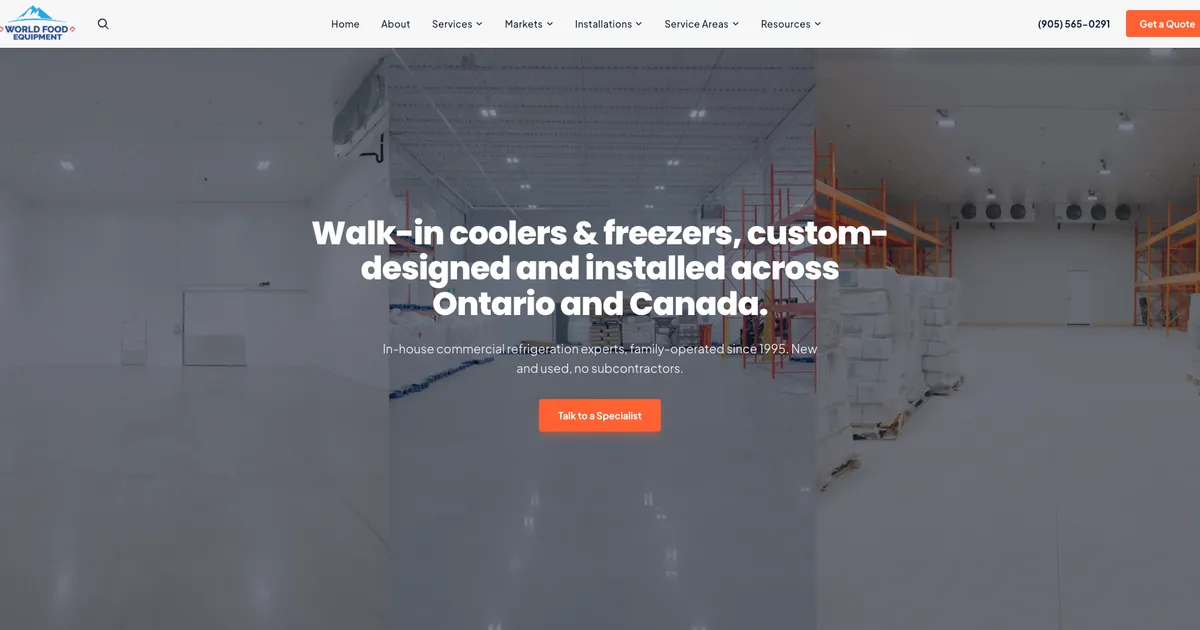
That headline reads “Walk-in coolers & freezers, custom-designed and installed across Ontario and Canada.” on a real client build. It names the product and the service area in the first line a visitor and a crawler both read, instead of saying something like “Welcome to our website”. If you want the full picture of how the site and your Google presence work together, local SEO for contractors covers the strategy and the local SEO services page covers what the setup involves.
How Do You Show Google Which City You Serve?
City-level terms work the same way. A page built to rank for SEO in Mississauga says Mississauga in its title, its headline and its opening lines, because a page that never names the city is asking Google to guess.
Is Your Website Too Slow to Compete?
Speed rarely keeps a site out of the index, but it is a real tiebreaker once you are competing for a term, and most of the web is still failing it. Just 48% of sites had a good Core Web Vitals experience on mobile in 2025, up from 44% in 2024 and 36% in 2023 (HTTP Archive Web Almanac, 2025).
| Metric | What it measures | Good threshold | Good rate on mobile (2025) |
|---|---|---|---|
| LCP | How fast the biggest thing on screen loads | 2.5 seconds or less | 62% |
| INP | How fast the page responds when tapped | 200 milliseconds or less | 77% |
| CLS | How much the layout jumps while loading | 0.1 or less | 81% |
Thresholds are from the Chrome team’s web-vitals library; the mobile pass rates are 2025 figures from the HTTP Archive Web Almanac. LCP is where local business sites lose most often, and the cause is nearly always an oversized hero image.
Desktop tells you nothing useful here. 74% of desktop pages hit a good LCP against 62% on mobile (HTTP Archive Web Almanac, 2025), and your customers are on phones. Test at a 375px width before you believe any speed score, the same baseline every web design build here gets checked against.
Are You Missing From Google Maps Instead of Google Search?
These are two separate systems and they fail separately. The blue links come from your website; the map pack comes from your Google Business Profile, and no amount of website work will put you on the map if that profile is unclaimed, unverified, or missing a service area.
- Different requirement: organic results need a crawlable website. The map pack needs a verified Google Business Profile, and it will show a business that has no website at all.
- Different ranking inputs: proximity, categories, reviews and profile completeness drive the map pack, while page content and links drive organic results.
- Different fix order: if the phone is quiet and you serve customers locally, the profile is usually the faster win of the two.
The full walkthrough is in how to show up on Google Maps, and the ongoing work is covered on the Google Business Profile management page.
Which Checks Should You Run First?
Work top to bottom and stop at the first thing that is actually broken. The order matters, because there is no point tuning a title tag on a page Google has been told to ignore.
| What you are seeing | Most likely cause | Where to check | What fixes it |
|---|---|---|---|
site: search returns nothing |
noindex tag or a brand new site | Search Console URL Inspection | Remove the noindex, submit the sitemap |
| Some pages indexed, others missing | No internal links to those pages | Indexing then Pages report | Link them from the navigation, add to sitemap |
| Indexed but only found by business name | No page targets the service plus city | Your own page titles and H1s | One page per service, named properly |
| Wrong page ranking for a term | Canonical or duplicate URL variants | Page source, rel="canonical" |
Point canonicals at the page you want ranked |
| Ranking but nobody clicks | Weak or missing meta description | Search Console Performance | Rewrite the title and description |
| Nowhere on the map | Unclaimed or unverified profile | Google Business Profile | Claim, verify, complete every field |
Two of those are worth the ten minutes today regardless: verify the site in Search Console, and run the site: search. Together they tell you which half of this article you actually need.
Frequently Asked Questions
How do I check if my website is on Google?
Type site: followed by your domain into Google, with no space, like site:yourbusiness.ca. If Google returns a list of your pages, your site is indexed and the problem is ranking rather than indexing. If it returns nothing at all, Google has no copy of your site, and that is a different and usually faster problem to fix.
Why is my website not showing up on Google but competitor sites are?
In most audits I run, both sites are indexed and the competitor simply has more of what Google uses to rank: pages that name the service and the city, a complete Google Business Profile, reviews, and a longer history. Being invisible for a search term is normally a ranking gap, not a technical fault. The exception is a site carrying a leftover noindex tag, which is worth ruling out first because it takes two minutes.
How long does it take for a new website to appear on Google?
Indexing is usually the fast part once Google can reach the site and you have submitted a sitemap in Search Console. Ranking for anything competitive takes months, and that gap is where most owners panic. The site is in Google, it is just appearing on page five where nobody scrolls.
Do I have to submit my website to Google?
You do not have to, but you should. Google finds most sites by following links, and a brand new business site often has almost none pointing at it. Verifying the site in Google Search Console and submitting an XML sitemap removes the guesswork and gives you the URL Inspection tool, which tells you exactly what Google thinks of any single page.
Why does my website show up when I search for it but not for my customers?
Searching for your own business name is the easiest possible query, and you are usually signed in, sitting near your own address, and have visited the site before. Your customers are searching for a service plus a city, which is far more competitive. If you only appear for your business name, you are indexed but not yet ranking for the searches that actually bring in work.
Can a web designer accidentally stop my site from being indexed?
Yes, and it is one of the more common reasons a brand new site is invisible. Sites are often built behind a noindex tag or a blocked robots.txt file so the unfinished version stays out of search, and that block is meant to be lifted at launch. When nobody lifts it, the site is live for humans and invisible to Google until somebody checks.
Wrapping Up
Nearly every “my website is not showing up on Google” call turns out to be a ranking problem wearing an indexing costume. The site: search settles it in about five seconds, and from there you either have a tag to remove or a few months of real work ahead of you.
If it is the second one, the work is unglamorous and well understood. It is a page for each service you sell, titles and headlines that name the city, a verified Google Business Profile, and a site fast enough on a phone. None of that is a trick, it is just the part most sites skip.
If you would rather have someone else run the checks, get a free website audit and I will tell you which of the two problems you have and what it will take to fix it.
Further reading: