Replacing an old website without losing your rankings is mostly one job done properly: making sure every address the old site used still leads somewhere sensible on the new one. The new design is the part everyone talks about. The redirects are the part that decides whether your phone still rings in week two.
This post covers what to inventory before the switch, how to decide which old pages to keep, what a 301 does that a 302 does not, and what to check in the first two weeks after launch. It uses this site’s own rebuild as the worked example, including the one place the obvious answer is wrong.
Key Takeaways
- A 301 is the permanent signal, a 302 is not: MDN says search engines receiving a 301 “attribute links to the original URL to the redirected resource, passing the SEO ranking to the new URL”, while with a 302 they “will not attribute links to the original URL to the new resource” (MDN Web Docs, MDN Web Docs, accessed 2026)
- The default is the wrong one: in a Cloudflare Pages
_redirectsfile the status code is optional and defaults to 302, so a redirect written without301on the end quietly sends the temporary signal when you meant the permanent one (Cloudflare Pages docs, accessed 2026)- Your sitemap is the inventory: export it before anyone touches the old build. This site publishes 50 URLs in its sitemap out of the 52 pages it builds, and knowing which two are missing is the point of the exercise.
A note on the sources. The status code definitions here come from MDN and from RFC 9110, the HTTP specification, and they describe what each code is supposed to mean rather than measuring how Google handles any one site. Search engines do their own interpretation on top of that, so treat the advice below as which signal to send rather than a promise about what any particular crawler does with it. The page and URL counts are from this site’s own build output on the day this post was published, which is a worked example rather than a benchmark.
What Actually Breaks When a New Website Replaces an Old One?
The addresses. A rebuild nearly always changes URLs, and every link, bookmark, directory listing and search result aimed at the old ones carries on aiming at them. Change nothing else and those visitors hit an error page.
MDN states the problem plainly: “When you restructure websites, URLs change. Even if you update your site’s links to match the new URLs, you have no control over the URLs used by external resources” (MDN Web Docs, accessed 2026).
The fix is the obvious one, and the same guide spells it out: “You don’t want to break these links, as they bring valuable users and help your SEO, so you set up redirects from the old URLs to the new ones.”
Here is what is actually pointing at your old URLs right now:
- External links you do not control: a supplier directory, the chamber of commerce listing, a local news mention, a competitor’s comparison page. Nobody is going to update those for you.
- Google’s index: search results keep showing the old URL until Google recrawls and learns about the replacement, which is not instant.
- Your Google Business Profile: the website field, the service descriptions and every post you have ever added all point at an address from the old site.
- Paper and email: quotes, invoices, email signatures, a vehicle decal and anything you have printed in the last five years.
- Internal links: your own menus and buttons, which are the only ones in this list you can genuinely fix rather than redirect.
How Do You Build an Inventory of the URLs You Already Have?
Export three lists before anything gets switched off: the sitemap, the Search Console pages report, and a crawl of the old site as it stands. Together they tell you which URLs exist, which ones earn anything, and which ones nobody has linked to in years.
- The sitemap is the fastest start: try
yoursite.ca/sitemap.xmlandyoursite.ca/sitemap-index.xmlin a browser, then save the page. It is a machine-readable list of every URL the old build thought was worth publishing. - Search Console tells you which URLs earn something: the Pages and Performance reports show impressions and clicks per URL, which is the only honest way to rank your old pages by value. The post on how to tell if your website is working covers reading those reports properly.
- A crawl catches the orphans: any free site crawler will find pages that exist but never made it into the sitemap. Old landing pages and abandoned city pages live here.
- Your own memory is the worst list: owners routinely forget the PDF price list, the seasonal promo page and the thank-you page a form still points at.
This site’s build output is a small worked example of why the two lists differ. Counting this post, it builds 52 pages and publishes 50 of them in the sitemap, and the gap is deliberate. The thank-you page is filtered out in the build config and the 404 page is dropped by the sitemap generator on its own, because neither belongs in a list of pages you want found in search.
The public folder also holds files that are not pages at all, from robots.txt and llms.txt to a static preview page, and those are exactly the kind of thing a crawl turns up and a sitemap never mentions. The 50 URLs that are listed include every blog post and both client case studies.
Which Old Pages Are Worth Keeping, and Which Should You Let Go?
Sort every URL on the inventory into four piles. Most pages on a small business site fall into the first two, and the fourth pile is larger than people expect.
| The old page | What to do with the URL | Status |
|---|---|---|
| Earns clicks or has external links, and the new site has an equivalent | Keep the same URL if you can, redirect it if the slug changed | 301 |
| Replaced by a broader or better page | Redirect to the closest relevant page, not the homepage | 301 |
| Service you no longer offer, with no equivalent | Redirect to the parent service page or the services hub | 301 |
| Expired promo, duplicate, or a page nobody has ever visited | Let it return a clean error and move on | 404 or 410 |
Two rules make the sorting quick. Keep the URL unchanged whenever the page survives, because a redirect you never needed is a redirect that cannot break. And resist the urge to redirect everything: a tidy site with fifteen real pages beats one dragging forty redirect lines behind it for pages that were thin to begin with.
The slug is also your one free chance to fix a bad URL. If the old page lived at /services.php?id=12, the rebuild is when it becomes /furnace-repair, and the post on what to put on a service page covers what belongs on it once it is there. Deciding the URL structure up front is part of web design and development rather than something to sort out the week of launch.
What Does a 301 Redirect Actually Do, and Why Not a 302?
A 301 tells every browser and crawler that the move is permanent, and that is the instruction that carries your ranking across. MDN is explicit: search engines receiving a 301 “will attribute links to the original URL to the redirected resource, passing the SEO ranking to the new URL” (MDN Web Docs, accessed 2026).
A 302 says the opposite. For a 302, MDN states that search engines “will not attribute links to the original URL to the new resource, meaning no SEO value is transferred to the new URL” (MDN Web Docs, accessed 2026). Same visitor experience, same browser behaviour, opposite instruction to the crawler.
The specification says the same thing in colder language. RFC 9110 defines a 301 as meaning “the target resource has been assigned a new permanent URI and any future references to this resource ought to use one of the enclosed URIs” (RFC 9110, 2022).
| Code | Meaning | What it tells a crawler, per MDN and RFC 9110 |
|---|---|---|
| 301 | Moved permanently | Update the record and treat the new URL as the real one |
| 308 | Permanent redirect | Same as 301, and the request method cannot be changed |
| 302 | Found, temporarily moved | Keep the old URL as the real one |
| 307 | Temporary redirect | Same signal as 302, and the request method cannot be changed |
| 404 | Not found | Treat the page as missing, with no statement about permanence |
| 410 | Gone | Treat the page as intentionally and permanently removed |
Two details matter when you are checking the work. MDN’s permanent-redirect table lists the typical use case for a 301 as “Reorganization of a website” (MDN Web Docs, accessed 2026), which is exactly what a rebuild is. And a 301 is sticky in a way a 302 is not.
Does a Wrong Redirect Stay Wrong After You Fix It?
For a while, yes, and that is the argument for getting the map right before launch rather than patching it afterwards. A permanent redirect is allowed to be cached, so a browser that has already followed a bad one can keep following it.
RFC 9110 states that “A 301 response is heuristically cacheable; i.e., unless otherwise indicated by the method definition or explicit cache controls” (RFC 9110, 2022). MDN explains what heuristic caching means: “HTTP is designed to cache as much as possible, so even if no Cache-Control is given, responses will get stored and reused if certain conditions are met” (MDN Web Docs, accessed 2026).
When a server does set a lifetime explicitly, it can be a long one. MDN’s own worked example of a 301 is served with max-age=2592000, which is thirty days.
The useful consequence is in that quoted qualifier: an explicit Cache-Control on the redirect response overrides the guesswork. On a host where you control that header, a short lifetime keeps the option to change your mind. On Cloudflare Pages you do not set it per rule, which is one more reason to get the map right before launch rather than after.
Where Should a Deleted Page Point, and When Is a 404 the Right Answer?
At the closest page that answers the same question, and a 404 is right whenever there is no such page. Redirecting a deleted page to something unrelated is worse than letting it break, because it wastes the visitor’s click and tells Google the subject moved somewhere it did not.
- Closest match first: a retired
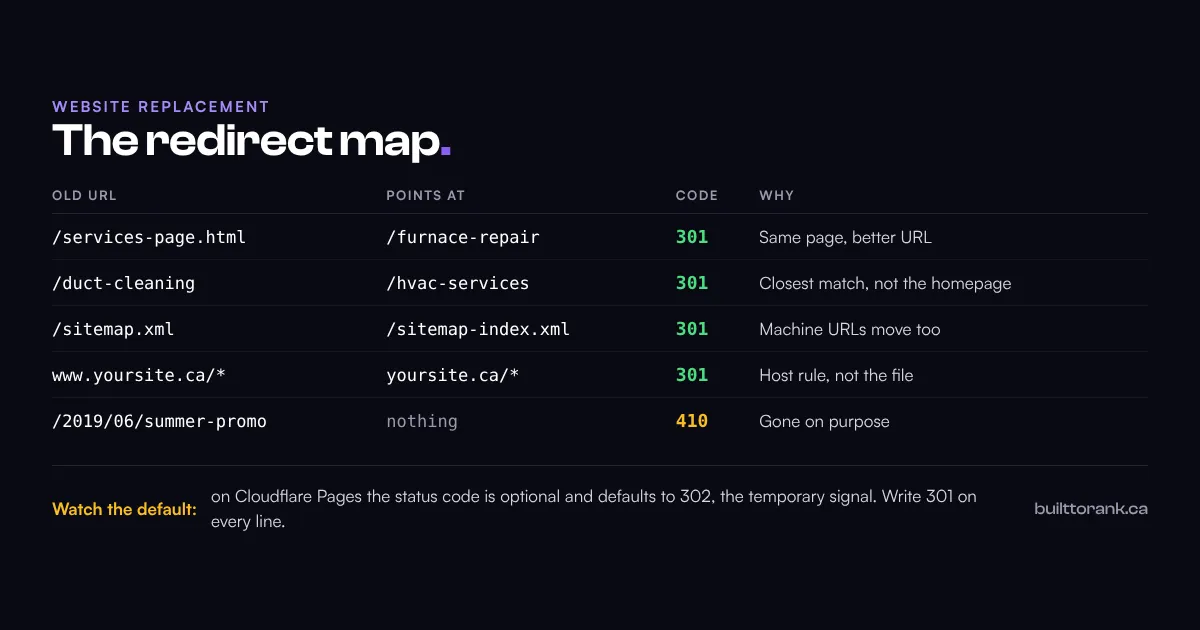
/duct-cleaningpage belongs on the HVAC service page, not the homepage, because that is where the person who clicked wanted to end up. - The parent page is the fallback: when no single page matches, the hub above it usually does. A retired city page belongs on the services hub.
- The homepage is the last resort: on this site exactly one redirect points there, because the page it replaced has no equivalent on the new build. That is the only situation where it is the right answer.
- A clean error is allowed: a 404 is the safe answer whenever you are not certain the removal is permanent, and the specification notes that a 404 “does not indicate whether this lack of representation is temporary or permanent” (RFC 9110, 2022).
- 410 is the stronger statement: use it when the page is gone on purpose. MDN says that for a 410, “website owners should remove or replace links that return this code”, and that if you do not know whether the removal is permanent, “a 404 status code should be used instead” (MDN Web Docs, accessed 2026).
Whichever you choose, your 404 page has a job to do. It should carry the menu, a search box or a short list of your main services, and your phone number, so the visitor who hit a dead link can still reach you.
How Do You Write the Redirects Without Breaking Them?
On most modern hosts the redirect map is a plain text file that ships with the site, one rule per line, in the order you want them tested. The syntax is simple enough that the mistakes are all in the details.
On Cloudflare Pages, which is what this site runs on, the rules live in a file called _redirects and each line reads source, destination, then the status code. The status code is the part to watch.
Cloudflare’s documentation lists it as optional with a default of 302 (Cloudflare Pages docs, accessed 2026), which means a line written without 301 on the end sends the temporary signal instead of the permanent one. Every redirect line in this site’s own file ends in an explicit 301 for that reason.
- Write the status code on every line: never rely on the host’s default, whoever the host is.
- Order matters: Cloudflare’s docs are explicit. “If there are multiple redirects for the same
sourcepath, the top-most redirect is applied” (Cloudflare Pages docs, accessed 2026), so put your specific rules above your catch-all ones. - Patterns save hundreds of lines: placeholders let one rule move a whole URL shape. Cloudflare’s own example is
/blog/:year/:month/:date/:slugto/news/:year/:month/:date/:slug(Cloudflare Pages docs, accessed 2026), which is the fix for a date-based blog structure you are abandoning. - There is a ceiling: a
_redirectsfile is capped at “2,000 static redirects and 100 dynamic redirects, for a combined total of 2,100 redirects” (Cloudflare Pages docs, accessed 2026), which is generous for a local business and a real constraint for a big catalogue. - Two things the file cannot do: on Cloudflare Pages,
_redirectshandles neither domain-level redirects nor query-string sources, both marked unsupported in the same documentation (Cloudflare Pages docs, accessed 2026). Movingwwwto the bare domain, or matching an old?id=12address, is a redirect rule at the edge instead of a line in the file. - Fix internal links instead of redirecting them: MDN is blunt that a redirect “has a significant performance cost (as an extra HTTP request occurs)” and its advice is direct: “If you can avoid it by correcting internal links, you should fix those links instead” (MDN Web Docs, accessed 2026).
How Many Redirects Is Too Many?
Fewer than you think, because each one costs the visitor a round trip before anything renders. The Web Almanac’s performance chapter counts redirects inside Time to First Byte, alongside connection setup and server processing (HTTP Archive Web Almanac, 2025), so a chain of three redirects is three round trips before the visitor sees anything.
Browsers also refuse to follow a chain forever. The Fetch Standard, which defines how browsers make requests, instructs them: “If request’s redirect count is 20, then return a network error” (WHATWG Fetch Standard, accessed 2026). Nobody writes twenty deliberately, but a rule pointing at a URL that redirects again is how chains appear, and a rule pointing back at itself hits the ceiling immediately.
What Else Breaks When You Replace a Website Besides the Pages?
The machine-readable files, the hostname and the image URLs, none of which appear on a page inventory. These are the items that generate a quiet week-two problem rather than an obvious day-one one.
- The sitemap file name: this site’s sitemap moved from
/sitemap.xmlto/sitemap-index.xmlwhen the generator changed, so the old path carries a 301 of its own. Anything that had subscribed to the old file would otherwise be reading a dead URL. - One hostname, decided once: pick
yoursite.caorwww.yoursite.cabefore launch, redirect the other at it, then use the winner in every canonical tag. How Google chooses between duplicate addresses is covered in why your website is not showing up on Google. - Trailing slashes:
/servicesand/services/are different URLs to a crawler, so the build has to settle on one shape and the host has to agree with it. This site emits the no-slash form and is configured so the host does not bounce requests back to a trailing-slash variant, which is a decision to make before launch rather than after. - Images and PDFs: a price list at an old
/uploads/path is a URL like any other, and people do link to those directly. - Robots and machine files:
robots.txt, andllms.txtif you publish one, both reference URLs and both need rewriting rather than copying.
One more case needs a different tool entirely. If the rebuild moves you to a new domain rather than new URLs on the same one, Search Console has a Change of Address setting that tells Google the whole site has moved, and the 301s from the old domain need to stay up while that works through.
How Do You Confirm You Have Not Lost Rankings After Launch?
Spot-check the redirects by hand on day one, then watch Search Console for the two weeks after that. Most problems from a replacement show up in that window, and they are cheapest to fix while the old URLs are still fresh in Google’s index.
- Check the status code, not just the landing page: a browser follows a 301 and a 302 identically, so arriving at the right page proves nothing about which one you sent. Open the Network tab in your browser’s developer tools, or run
curl -I https://yoursite.ca/old-pagein a terminal, and read the status on the first response. You want301. - Click your own old links: take the top ten URLs from the inventory and confirm each one lands on the right page rather than the homepage or an error.
- Watch for redirect loops: MDN describes these as the case where “additional redirections follow the one that has already been followed”, leaving a loop “that will never be finished and no page will ever be found” (MDN Web Docs, accessed 2026). You get either a server error or a browser redirect error, never a clean 404.
- Resubmit the sitemap: add the new sitemap URL in Search Console so the new addresses get crawled deliberately rather than incidentally.
- Read the Not found report: Search Console lists the URLs it tried and failed to fetch, which is the most reliable list of redirects you forgot.
- Compare like for like: impressions and clicks by page, the two weeks after launch against the two weeks before, is the comparison that answers the question you actually care about. Reading those reports properly is its own subject, covered in how to tell if your website is working.
A dip in the first couple of weeks is normal while Google recrawls. A dip that is still there after a month is worth investigating rather than waiting out, and the redirects are the cheapest thing to rule out first because the inventory you exported already tells you what to test.
Your Google Business Profile is a separate asset from the website, so replacing the site does not reset the profile or the reviews on it. The thing to check there is that its website link points at a URL on the new site that actually resolves, which is also where local SEO work carries on from.
Frequently Asked Questions
Will I lose my Google rankings if I get a new website?
Not if the old addresses still lead somewhere sensible. Rankings are attached to URLs, so the risk is not the new design, it is URLs that change with nothing pointing the old ones at their replacements. MDN describes the mechanism plainly: a search engine receiving a 301 will attribute links to the original URL to the redirected resource, passing the ranking to the new URL.
How long should I keep redirects from an old website?
Treat them as permanent. The cost of keeping a text file of redirect lines is zero, and old links keep arriving for years from directories, documents and other people’s pages. The only reason to remove one is if it starts conflicting with a new URL you want to use.
Do I need to redirect every single page from my old site?
No, and trying to is how people end up with a mess. Redirect the URLs that earn something or that other sites link to, point genuinely retired pages at the closest relevant page, and let the rest return a clean error. A thin page nobody has ever visited does not need a line in the file.
Can I just point all my old URLs at the homepage?
It is better than letting them break and worse than doing it properly. Someone who clicked a link about furnace repair and lands on your homepage has to start their search again, and you have told Google that the old page’s subject matter now lives on a page about everything. Point each old URL at its closest match and save the homepage for the handful of pages that genuinely have no equivalent.
What is the difference between a 301 and a 302 redirect?
A 301 says the move is permanent and a 302 says it is temporary, and that difference is the whole of what you are telling a crawler. MDN states that search engines receiving a 302 will not attribute links to the original URL to the new resource, meaning no value is transferred. For a site replacement you want 301 on every line.
Who sets up the redirects, me or my web designer?
Your designer does the work, but you should ask for the redirect map before launch and keep a copy. It is a short list of old URL, new URL and status code, and it is the single most useful document in a rebuild. If a designer cannot produce one, that tells you something about how the launch is going to go.
Wrapping Up
A website replacement is two projects wearing one invoice. The visible one is the design and the copy. The invisible one is URL housekeeping, and it is the one that decides whether the rankings you have already earned show up on the new site or disappear with the old one.
None of it is complicated. Export the inventory, sort the URLs into four piles, write a 301 on every line, and watch Search Console for the two weeks after launch. The reason it goes wrong so often is not difficulty, it is that nobody is assigned to it.
That is also why the redirect map is worth asking for in writing before the build starts. The post on what to ask a web designer covers the rest of that conversation, and website maintenance is where the checking lives once the new site is live.
If you are about to replace a site that already gets found, or you have replaced one and the calls have gone quiet, that is a short conversation and a quick look at the redirects. Get a free website audit and I will tell you which old URLs are still live, which ones are broken, and what it would take to put them back.
Further reading: Why is my website not showing up on Google? · How do you know if your website is actually working? · What should you ask a web designer before you hire one?