A website build almost never stalls on the building. It stalls the week after the design is approved, when the folder of photos and service descriptions has not arrived. This post is exactly what to send your web designer before that happens: what goes in the folder, what good looks like for each piece, and what to do when one of them does not exist.
Key Takeaways
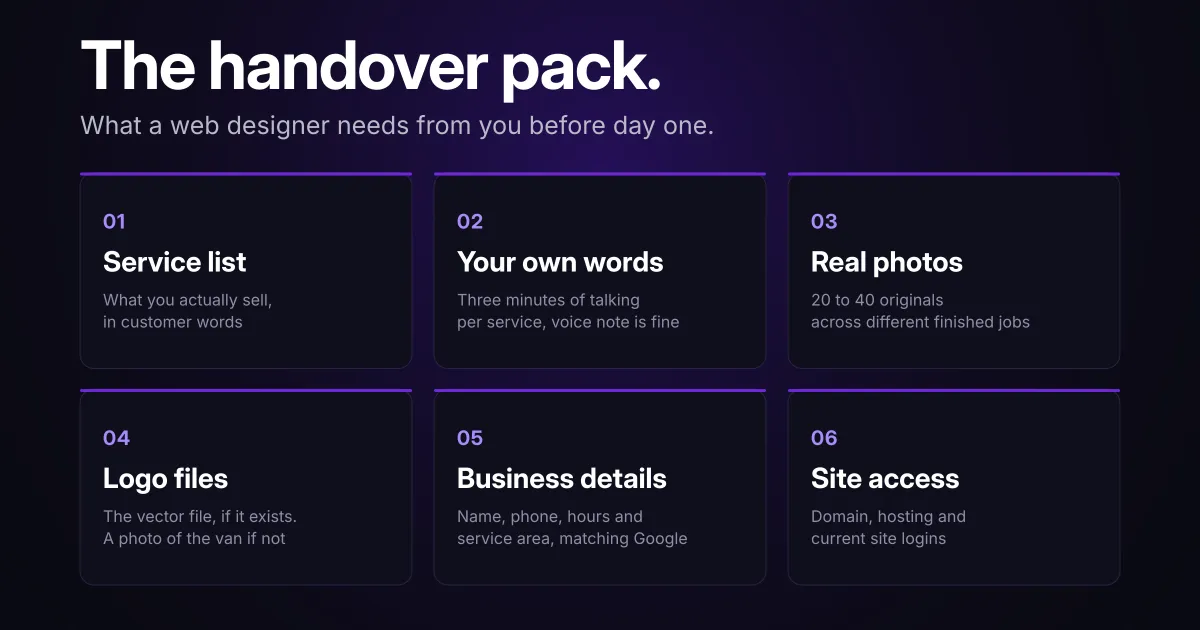
- Six things cover almost every small business build: your service list, your own words on each service, original photos of finished work, your logo files, your business details as Google has them, and access to your domain and current site.
- Processing only runs one way: the illustration below is kept in this repository as a 2400x2400 JPEG at 275 KB, and the 1200x630 WebP copy you are looking at is 33 KB. Same artwork, cropped, rescaled and re-encoded in a different format. Nothing in that chain can be run backwards, which is why you send the biggest file you have and never the one you shrank.
- The format matters more than owners expect: a photo straight off an iPhone is often a HEIC file, and browsers covering only about 17% of tracked global usage can display one, against 97% for WebP (Can I use: HEIF and Can I use: WebP, data updated 29 October 2026, measured as the share of tracked global users whose browser has full support).
- The ask is small, and it is not instant: a few hours of your own time, mostly spent finding photos. It is not hard work. It is just work that only you can do, and it is the work that sets your launch date.
What Do You Need to Send a Web Designer Before Day One?
Six things cover almost every small business build: your real service list, your own words about each service, photos of finished work, your logo files, your business details exactly as they appear on Google, and access to your domain and any existing site. None of it has to be polished. It has to be accurate, and it has to arrive.
That distinction decides what is recoverable. Clumsy wording is an afternoon’s work for a designer. A photograph of a job you finished last spring cannot be fixed, written, or bought.
| What to send | What good looks like |
|---|---|
| Service list | Every service you actually sell, in the words customers use, with the ones you want more of marked |
| Your own words | Three minutes of plain talking per service, written or recorded |
| Photos of real work | 20 to 40 originals across as many different jobs as you can find, plus one of you or your crew |
| Logo files | The vector file if it exists, otherwise the cleanest version you have |
| Business details | Name, phone, hours and service area, matching your Google profile |
| Domain and site access | Registrar login, hosting login, current site admin, and who runs your email |
When something on that list is missing, the gap gets filled by the nearest available substitute, and the substitutes are all worse. Missing photos become stock photography that your competitors are also using. Missing words become copy that would fit any business in your trade.
What Counts as Usable Copy, and What Should the Designer Write?
You supply substance, the designer supplies structure and polish. No designer can know what you charge, which jobs you turn down, how far you drive, or the question every customer asks on the phone. I can write the page, but not the five things that make it yours.
The fastest way to get it out of your head:
- Talk, do not write: record a three-minute voice note per service, as if a customer just asked you what it involves and what it costs.
- Name the jobs you want: say which two services you want more of and which one you would happily stop selling.
- List the real questions: the five things customers ask before they book, in their words, not yours. Those become the page’s headings and the FAQ.
- Give the boundaries: your service radius, the jobs you do not take, the minimum call-out, and anything you want kept off the site entirely.
- Send the documents you already have: a price list, a menu, a product or service catalogue, a spec sheet, a brochure. Most owners forget these exist and they are usually the most accurate thing in the whole handover.
- Hand over your credentials: licence and insurance details, certifications, WSIB clearance, association memberships, and which supplier or manufacturer logos you are allowed to display.
- Say what you can quote: your Google review link, and whether any named customer has agreed to be quoted. Nothing goes on the site that a real person has not agreed to.
- Name the people: staff names, titles and a line each, if the site needs a team section. A clinic or a firm usually does. A one-person trade usually does not.
- Send three reference sites: two you like, one you cannot stand, and the competitor you want to outrank. This takes ten minutes and saves an entire revision round.
Length is not the thing to worry about. For scale, the median mobile home page in the 2025 HTTP Archive crawl “contained 378 words” of rendered text (HTTP Archive Web Almanac, 2025). That is a description of what pages hold rather than a target to hit, and it is a useful reminder that nobody is asking you for an essay.
How much a given page actually needs, and in what order, is the subject of what a local business should put on a service page, which takes the position that word count is not a ranking setting.
Which Photos Should You Send, and in What Format?
Send the largest original files you have, across as many different jobs as you can find, and let the build handle everything after that. Resizing, cropping and converting take seconds per image, and a full folder is a few hours of a build. What a build cannot do is add detail that was thrown away before the file arrived.
What format should you send?
Whatever your camera produced, untouched. The reason is physics, and MDN states the mechanism plainly: a small raster image “starts to look grainy when displayed larger than its original size” (MDN Web Docs). The same page explains the machinery that makes several sizes from one file, where “The browser could then determine the optimal resolution to load based on the screen size of the user’s device”.
Each of those sizes comes out of your biggest file. That is why I ask for the original rather than the copy you emailed yourself.
| What you have | What to send | Why |
|---|---|---|
| iPhone photos | The originals, through a shared folder or file transfer | Messaging apps re-compress, and a HEIC file needs converting anyway |
| Android photos | The originals, same way | Usually JPEG, sometimes HEIF, and either way the build converts it |
| A folder from a photographer | The full-resolution export, not the web gallery | The web gallery is already shrunk for someone else’s layout |
| Scanned prints or old brochures | Flat scans at the highest setting your scanner offers | Photographs of paper pick up shadows and skew |
The format you send is not the format that ships. The Almanac’s verdict on the web’s image habits is that “Almost all of the JPEGs, PNGs, and GIFs on the web would be better-served using a modern format” (HTTP Archive Web Almanac, 2024), and doing that conversion is the build’s job, not yours.
How many photos is enough?
Twenty to forty files is the right amount to hand over, and expect a designer to use fewer than you send. Rejects, near-duplicates and shots that will not crop are normal, so the handover number is deliberately larger than the number that ends up on the site. How many belong on the finished pages is a separate question, answered in the post linked below.
- Different jobs beat better photos: the same hero shot repeated across six pages reads as a template site, which is exactly the impression you are paying to avoid.
- Do not pre-crop anything: a square crop for Instagram is the wrong shape for a page banner, and the original can still produce both.
- Include one of you: a single photo of the owner or the crew does more for a local business page than another shot of finished work.
- Check permission before you send: if a photographer or a supplier provided an image, or a customer asked you not to photograph their property, flag it now rather than after it is on a page.
- Ask what happens to them: a fair question for any designer is what they do with your originals, because resizing is the step that gets quietly skipped.
Half of crawled mobile pages carry a largest image above 0.54 megapixels, and the Almanac’s verdict on those pages is that they are “almost certainly sending the mobile crawler more pixels than it can actually display” (HTTP Archive Web Almanac, 2024). That figure is measured against the crawler’s own emulated mobile viewport rather than a real phone, and the point it makes is about published pages, not about what you should hand over.
Which of those photos actually sell work, and which to skip, is covered in what to show and what to skip in construction website images. If you are uploading to your own site or your Google profile instead of handing files to a designer, compress them first, and that post covers the sizes.
What Logo and Brand Files Are Worth Digging Up?
The one file worth hunting for is a vector version of your logo, usually an .svg, .ai, .eps or .pdf from whoever designed it. Vector files are the ones that scale, because as MDN puts it, “SVG-format vector images can be rendered at any size without loss of quality” (MDN Web Docs). A 400-pixel PNG pulled off an old website holds up at thumbnail size and goes soft the moment it is shown any larger.
What to look for, in descending order of usefulness:
- The vector file: check the email thread from whoever made the logo, your print shop, or your sign and vehicle wrap supplier. Sign shops almost always still have it.
- The exact colours: a hex code or a Pantone number from a print job beats anyone eyedropping a screenshot.
- The font, if you know it: often recorded on an invoice from a print or sign job, and it saves a guess that never quite matches.
- Printed material: business cards, invoices, truck decals and uniforms, photographed flat. These show how the brand already looks to customers.
- A plain note if it is all gone: I have rebuilt a mark from a photo of a van before, and knowing it needs rebuilding changes the schedule by a day rather than a week.
Which Business Details Have to Match Everywhere?
Your business name, phone number, hours and service area need to match between the new site and your Google Business Profile. Write them out once and send them, rather than leaving them to be copied off an old site that may already be wrong. Every one of them appears in more than one place on a finished build, so an error gets multiplied rather than contained.
These are also the details that end up in the page’s machine-readable markup, where schema.org names each field: openingHours for “The general opening hours for a business.” (schema.org) and areaServed for “The geographic area where a service or offered item is provided.” (schema.org). That vocabulary is how the information is labelled in the code, which is a reason to send the real values rather than approximations.
- Legal and trading name: both, if they differ, and which one customers actually say.
- The phone number that gets answered: not the one on the van if it rings a line nobody picks up.
- Real hours: including the ones that matter locally, like whether you answer after six or take Saturday calls.
- Service area in plain names: the cities and neighbourhoods you genuinely cover. In my experience those names are what people actually type across the GTA, so send the real list rather than a radius.
- Email that forwards to a monitored inbox: worth testing before launch, not after. A form that sends to an address nobody opens is the quietest way to lose work.
- Manager access to your Google Business Profile: the listing is a bigger source of calls than the site for many local businesses, and the two have to agree.
That listing is its own piece of work, covered in Google Business Profile management and in showing up on Google Maps.
What Should You Hand Over if You Already Have a Website?
Two things: a list of the pages the old site has, and the logins that control the domain, the hosting and the site itself. The page list decides what gets kept, rewritten or redirected, and the logins decide whether launch day is an afternoon or a two-week chase through old email accounts.
- The URL list: export it, screenshot the menu, or just send the sitemap link. Every page that currently exists is a page someone could already be finding.
- Registrar access: the account where the domain itself is held, which is the single most important login in the project.
- Hosting and site admin: separate from the registrar more often than owners expect.
- Who runs your email: if your address ends in your own domain, say so and name the provider. Email and the website live on the same DNS records, and a mail outage is the one launch failure that genuinely costs a small business money.
- Anything else connected: booking tools, payment links, chat widgets, email marketing, Search Console and analytics access.
- What you want to lose: pages for services you no longer sell, which is a decision rather than a file.
One note on sending the logins. Use the invite-a-user option in each account wherever it exists, and send passwords separately from the folder of files, never in the same email as everything else.
Both halves of this have real traps, so both have their own post: replacing an old website without losing your rankings covers the URL and redirect side, and what to ask a web designer before you hire one covers who should own each login and why it matters later.
What Did Two Real Builds Actually Need From the Business?
The handover list is not theoretical. Here is what the two client builds on this site needed from the businesses themselves, both of which have case studies you can read here.
What World Food Equipment had to supply
World Food Equipment, a Mississauga commercial refrigeration company running since 1995, got a 40-plus page build with a 3D walk-in cooler configurator. What only the business could supply:
- Per-project installation detail: the World Food Equipment case study shows project pages carrying scope, refrigeration spec and outcome, and those facts exist nowhere except the company’s own records.
- Real installation photography: finished walk-in coolers from the company’s own jobs, which no stock library sells and no designer can fake.
- The product parameters behind the configurator: a customer specs a cooler by dimensions, doors and temperature range, and I took those ranges from the company rather than inventing plausible ones.
- The questions buyers actually ask: I could not have written the resources section without the company telling me what buyers want to understand before spending on a walk-in.

What the Dev Vashi campaign had to supply
Dev Vashi, a Ward 11 Mississauga council campaign, needed a different pack for a site with an interactive ward map and a live countdown:
- Real geographic data for the ward: I built the address checker and boundary map so residents could confirm they live in Ward 11 before committing to help, and an approximate boundary would have been worse than none.
- The platform in the candidate’s own words: the values, news and youth sections were positions, and a designer inventing a political position would have been a serious problem rather than a time-saver.
- A fixed date to count down to: election day, October 26, 2026, which set the entire site’s deadline.
- The accounts behind the live feed: the social section pulled real posts, which needed the real handles.
Neither of those is a five-page plumbing site, and that is the point. The bigger the build, the more of it is material only the business holds.
What Happens if You Cannot Get All of It Together?
The build starts anyway, in a specific order, with a written list of what is outstanding and a date against each item. Ask for two safeguards when you agree to that. Keep the final instalment attached to the launch rather than to the build being technically finished, and keep the outstanding list somewhere you can both open it.
How a sensible build sequences around a gap:
- Structure first: page map, layouts, mobile behaviour, forms and schema need nothing from you and can be finished while you gather material.
- Pages that need least from you next: a contact page, a service area page and an about page can usually be drafted off a single conversation.
- Photo-dependent pages last: galleries and project pages wait, because they are the ones that cannot be faked.
- One stand-in is acceptable: I will use a single placeholder image with a date against it, never a library of them.
- Put the outstanding items on a dated list: treat it the way you would a supplier delivery, because that is what it is.
The obligation runs both ways, and a quote that only lists your homework is half a plan. What you should expect back, with dates on it: a design direction to approve, first-draft pages to read, one named person who answers your questions, and a clear answer about what happens if the designer is the one who slips.
I put those dates in writing because my own worst delay on this site was a feature I built, shelved, and did not come back to for more than two months. What all of this does to the calendar is measured in how long a website takes to build.
There is also the option of paying someone to close the gap. A local commercial photographer for a half day, or a writer for three service pages, is usually cheaper than a build that sits unfinished for two months. Ask for names rather than a line item on your quote, so you can see what you are paying.
If the quote in front of you does not say who writes the copy and who supplies the photos, that is the question to ask before you sign. What a website should cost in Ontario covers how that line item usually gets hidden, and web design services sets out what is included in a build here.
Frequently Asked Questions
What do I need to give my web designer to get started?
Six things cover almost every small business build: a list of the services you actually sell, your own plain words about each one, photos of real finished work, your logo in the best file you can find, your business details exactly as they appear on Google, and access to your domain and any existing site. Nothing on that list needs to be polished. It needs to be accurate and it needs to arrive, because a designer can rewrite clumsy wording in an afternoon and cannot invent a photograph of your work at all.
Do I have to write the copy for my own website?
No, but you do have to supply the substance. A designer can structure, tighten and write the page, and cannot know what you charge, which jobs you turn down, how far you drive or what customers always ask on the phone. The fastest version of this is a voice note: talk through one service for three minutes as if a customer asked, send it, and let the writing come off that.
How many photos should I send my web designer?
Twenty to forty originals is the right amount to hand over, and expect fewer than that to reach the finished pages. Rejects, near-duplicates and shots that will not crop are normal, so the handover number is deliberately larger than the published number. What matters most is how many different jobs are represented, because twelve jobs at two photos each beats sixty shots of the same afternoon.
Can I send photos straight from my phone?
Yes, and send the biggest original file you have rather than anything you have resized or emailed to yourself. One caveat worth knowing: an iPhone photo is often a HEIC file, which most browsers cannot display, so it has to be converted during the build. That conversion is a normal step and takes seconds, but it is a reason to send originals through a file transfer or shared folder instead of a messaging app that re-compresses them.
What if I do not have a logo file?
Send whatever exists, including a photo of your van, your invoice header or an old business card, and say plainly that the original file is gone. A designer can usually rebuild a simple mark as a vector from a clear image. If the original is genuinely unrecoverable and the mark is weak anyway, that is worth knowing before the build starts rather than three days before launch.
Can a website be built before I have all my content ready?
The structure can, and the pages that depend on your material cannot be finished without it. A sensible build starts with the pages that need least from you, keeps a short written list of what is outstanding, and sets a date for the rest. Two things protect you in that arrangement: the final payment stays tied to launch rather than to the build being technically finished, and the outstanding list lives somewhere you can both see it.
Wrapping Up
Everything a web designer needs from you fits in one folder and a single email. Photos, your own words on each service, the logo file, the details written out, the logins, and the three reference sites.
The part that trips people up is not the size of the ask. It is that nobody told them what good looked like for each piece, so the folder sits half-finished while the build waits.
If you already have a site and want to know what is worth keeping before anyone asks you for a file, get a free website audit. If you are starting from nothing, send what you have and ask what is missing. Either way you will get a straight answer first.
Further reading: